Simple and fast steps to install the best IPTV player on your LG Smart TV directly from the official LG Content Store.
Turn on your LG Smart TV. Using your Magic Remote, press the Home button to open the bottom menu bar. Navigate left or right until you find the LG Content Store or Apps icon and click it to open the app store.
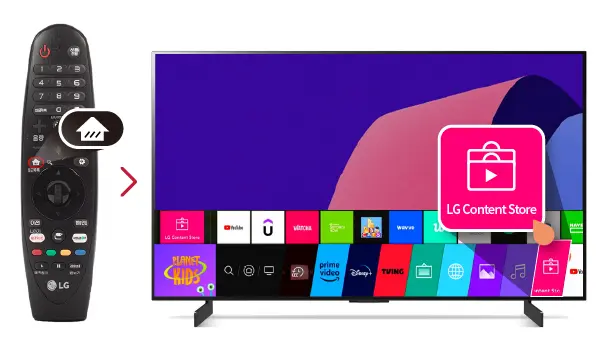
In the LG Content Store, navigate to the top of the screen and click on the Search (Magnifying Glass) icon. Using the on-screen keyboard, type IPTV Smarters or Smarters Player into the search box and hit Enter.
Search results will appear. Look for the IPTV Smarters Pro app icon and click on it to open its details page. Then, press the Install button. The app will begin downloading and installing on your TV automatically.
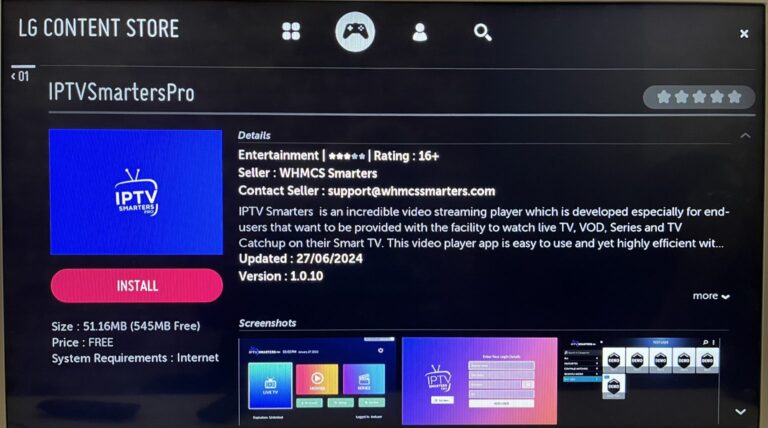
Once installation is complete, click Launch or return to your Home menu to open the app from there. When you open the app for the first time, accept the terms if prompted, then click Add New User or Login with Xtream Codes API to enter the subscription details provided by your IPTV service provider.
